Explain it simply
Explain it simply
A tuple is very similar to a list: it stores values in order and you read them by index. There is one difference: once created, it cannot be added to, shrunk or edited. You write it with parentheses instead of square brackets, like ("red", "green", "blue").
Tuples suit data whose parts always belong together and should not change: a birth date (1995, 8, 17), a map position (16.8, 96.1), an RGB colour (255, 128, 0). Choosing a tuple is the code's way of saying "nobody edits this".
Problem → Why → Solution
The problem: one missing comma lets "min" pass as admin
Allowed roles are kept in a tuple and checked with in. There used to be two roles, but after one was removed only ("admin") remained. Suddenly roles such as "min", "ad" and "dmi" are granted access too, and no error appears anywhere.
ALLOWED_ROLES = ("admin")      # meant to be a one-item tuple

role = "min"
if role in ALLOWED_ROLES:
    print("Access granted")    # runs!

print(type(ALLOWED_ROLES))      # <class 'str'>
Why does this happen?
In Python, the comma makes a tuple, not the parentheses. Parentheses only group, as in (2 + 3) * 4, so ("admin") is just the string "admin". On a string, in searches for a substring, which makes "min" in "admin" True. Only ("admin",), with the comma, is a one-element tuple, and then in compares whole elements.
Core concept: a tuple is an ordered, immutable collection
Like a list, a tuple is ordered and allows duplicates. fruits[0], fruits[-1], fruits[0:2], len(fruits), "apple" in fruits and a for loop all work exactly as on a list, and a slice returns a new tuple. The difference is immutability: fruits[1] = "mango" raises TypeError: 'tuple' object does not support item assignment, and there is no append() or remove(). A tuple has just two methods, count() and index().
| List | Tuple | |
|---|---|---|
| Syntax | [1, 2, 3] | (1, 2, 3) or 1, 2, 3 |
| Can it change? | Yes (mutable) | No (immutable) |
| One element | ["a"] | ("a",) with a comma |
| Typical use | A changing number of similar items | A fixed group of fields like (x, y) |
Because the comma is what creates a tuple, point = 3, 4 is a tuple even without parentheses; the empty tuple is (). Unpacking assigns a tuple's values to several variables at once: r, g, b = colors. If the number of variables does not match the number of elements, you get ValueError: too many values to unpack. Unpacking is also why a, b = b, a swaps two values without a temporary variable, and why a function can return low, high to hand back several values.
Immutable means the tuple's set of objects never changes. If a tuple holds a list, as in ([1], 2), that inner list can still be appended to. A tuple whose elements are all immutable can serve as a dictionary key, which a list never can.
Operations that seem to change a tuple actually build a new one. (1, 2) + (3,) returns a fresh tuple (1, 2, 3), (1, 2) * 2 returns (1, 2, 1, 2), and tuple(some_list) copies a list's elements into a new tuple. The original stays exactly as it was, so any other name still pointing at it is unaffected.
- Commas pack values together
- Once packed, you can only read
- To change, build a new package
- Unpacking spreads it into names
Picture a sealed package: you can look inside, but changing the contents means making a new package.
General pattern
record = (field_one, field_two, field_three)
single = (only_value,)            # the comma is required
empty = ()

value = record[index]             # read like a list
part = record[start:stop]         # a new tuple

first, second, third = record     # unpacking
left, right = right, left         # swap
updated = record[:1] + (new_value,) + record[2:]   # build a new tuple
Reading works just like a list; to change anything you build a new tuple from slices. Never forget the comma in a one-element tuple.
Example: create, read, try to change, unpack
This example reads a tuple, tries to modify it and catches the resulting TypeError with try/except. It then rebuilds a new tuple through a list, compares one-item tuples with and without the comma, and unpacks. The failing line really runs, so you see the actual error message instead of just being told about it, and the final loop goes over the rebuilt fruits tuple.
# ===== 1. Create a Tuple =====
fruits = ("apple", "banana", "cherry")
print(f"Tuple: {fruits}")
print(f"Type: {type(fruits)}")

# ===== 2. Indexing & Slicing =====
print("\n===== Indexing & Slicing =====")
print(f"First item: {fruits[0]}")
print(f"Last item: {fruits[-1]}")
print(f"Slice [0:2]: {fruits[0:2]}")

# ===== 3. Tuple is Immutable =====
print("\n===== Immutable =====")
try:
    fruits[1] = "mango"
except TypeError as err:
    print(f"Error: {err}")

# To change: convert to a list, modify, convert back (builds a NEW tuple)
temp = list(fruits)
temp[1] = "mango"
fruits = tuple(temp)
print(f"After conversion: {fruits}")

# ===== 4. Tuple Length =====
print(f"\nLength: {len(fruits)}")

# ===== 5. One-item Tuple =====
print("\n===== One-item Tuple =====")
a = ("apple",)   # Tuple (the comma makes it a tuple)
b = ("apple")    # Just a string in parentheses
print(f"Type of a: {type(a)}")
print(f"Type of b: {type(b)}")

# ===== 6. Tuple Unpacking =====
print("\n===== Unpacking =====")
colors = ("red", "green", "blue")
r, g, b = colors
print(f"Red: {r}, Green: {g}, Blue: {b}")

# ===== 7. Loop Through Tuple =====
print("\n===== Looping =====")
for item in fruits:
    print(item)
Code breakdown
- Lines 14-17
fruits[1] = "mango"Assigning to a tuple element raises TypeError, and the except block prints the message; fruits itself is untouched.
- Lines 20-22
fruits = tuple(temp)list(fruits) makes an editable copy, it is changed, and tuple() builds a new tuple. The old tuple was not modified; the name fruits simply moves to the new one.
- Line 30
a = ("apple",) # Tuple (the comma makes it a tuple)The trailing comma makes type(a) <class 'tuple'>. On line 31, ("apple") has no comma, so it is <class 'str'>.
- Line 38
r, g, b = colorsThe three elements go into three variables in order. Note that b is reused here, so the earlier string "apple" is replaced by "blue".
- Lines 43-44
for item in fruits:A tuple loops exactly like a list, printing the rebuilt ("apple", "mango", "cherry").
Tuple: ('apple', 'banana', 'cherry')
Type: <class 'tuple'>

===== Indexing & Slicing =====
First item: apple
Last item: cherry
Slice [0:2]: ('apple', 'banana')

===== Immutable =====
Error: 'tuple' object does not support item assignment
After conversion: ('apple', 'mango', 'cherry')

Length: 3

===== One-item Tuple =====
Type of a: <class 'tuple'>
Type of b: <class 'str'>

===== Unpacking =====
Red: red, Green: green, Blue: blue

===== Looping =====
apple
mango
cherry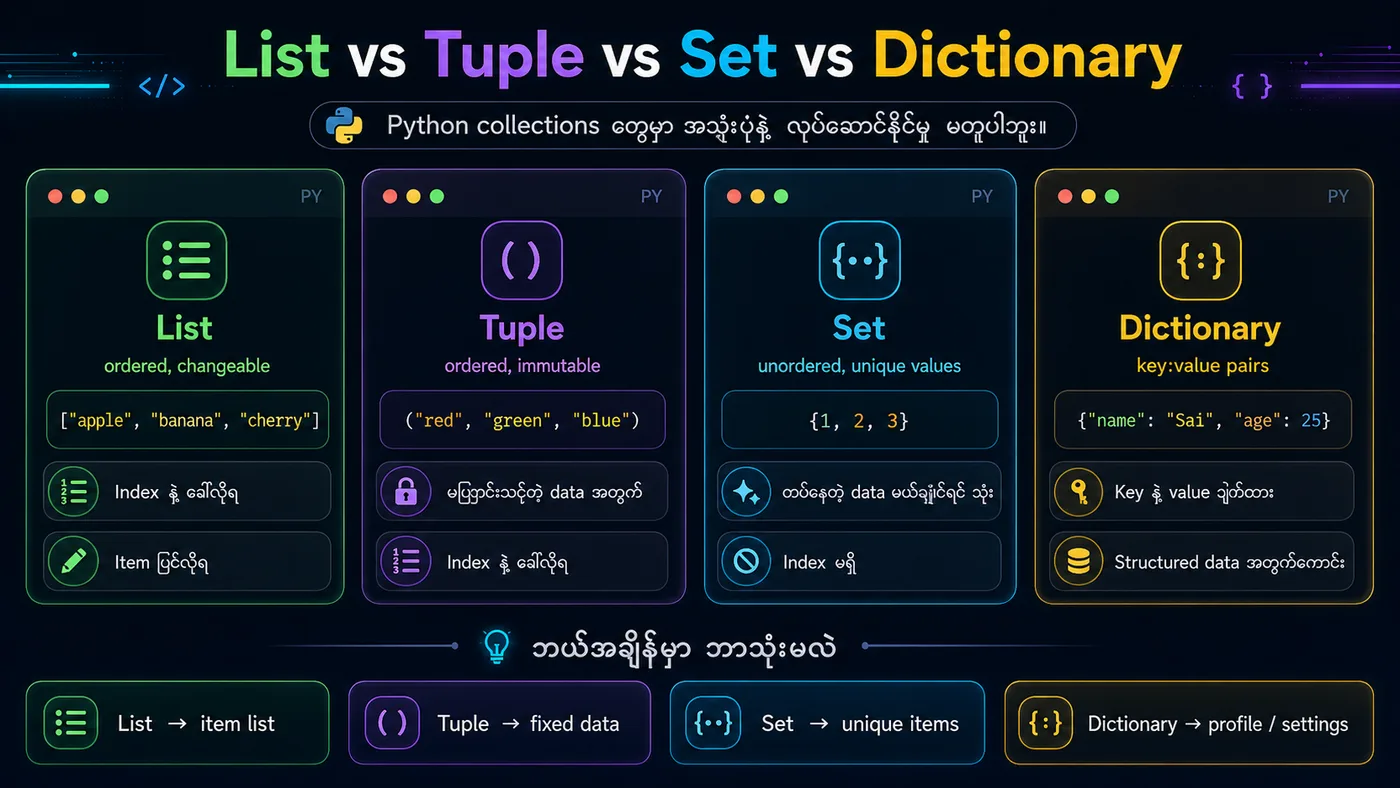
Star unpacking, and tuples as dictionary keys
When you do not know the exact number of elements, one starred variable collects the rest into a list: in first, *rest = (1, 2, 3), rest is [2, 3]. Because tuples are immutable they can be dictionary keys, which is handy for linking data to coordinates such as a (row, col) position on a grid. Dictionaries get their own lesson later on.
first, *rest = (1, 2, 3)
print(first, rest)              # 1 [2, 3]

board = {(0, 0): "start", (2, 3): "treasure"}
print(board[(2, 3)])            # treasure

pair = ([1], 2)
pair[0].append(9)               # the inner list can still change
print(pair)                     # ([1, 9], 2)
In real projects
Where this shows up in real projects
Database libraries usually return each row of a query result as a tuple. In sqlite3, cursor.fetchone() returns something like (1, "Aye", "aye@mail.com"), which you unpack with user_id, name, email = row. Built-ins such as divmod(17, 5) return a tuple, (3, 2), and looping over dict.items() hands you (key, value) tuples.
Keeping fixed configuration such as ALLOWED_EXTENSIONS = (".jpg", ".png") in a tuple means no part of the program can append to it by accident. str.endswith() and startswith() accept a tuple, so filename.endswith(ALLOWED_EXTENSIONS) checks every extension in one call. A function that returns a result together with an error, as in return result, error, is returning a tuple too. Tuples are also slightly lighter in memory than lists of the same length, which adds up when a program keeps millions of small records.
Common mistakes
Common mistakes
1. Forgetting the comma in a one-item tuple
("admin") is a string and (5) is an int. An in check turns into a substring test, and a loop walks over individual characters. Add the comma, ("admin",), and confirm with type().
2. Trying to change a tuple in place
point[0] = 10 raises TypeError and point.append(5) raises AttributeError. If the data changes often, choose a list; if it changes only occasionally, build a new tuple such as point = (10, point[1]).
3. Unpacking the wrong number of values
x, y = (1, 2, 3) raises ValueError: too many values to unpack (expected 2). When a function changes the shape of the tuple it returns, every caller breaks; star unpacking such as x, y, *_ = values can absorb the extras.
4. Assuming a list inside a tuple is frozen too
settings = ("dark", ["en", "my"]) looks untouchable, yet settings[1].append("th") works. A tuple fixes which objects it holds but does not protect a list inside it. If nothing should change, use tuples all the way down.
Best practices
Best practices
- Use a list for a varying number of similar items, a tuple for a fixed group of fields.
- Unpack tuples into meaningful names such as low, high; they read better than result[0].
- Store constant collections that must not change as tuples.
Mini challenge
Mini challenge: return several values and unpack them
Write a small program that uses tuples for returning values, unpacking, swapping and membership checks.
- score_stats(scores) returns a (lowest, highest, average to 1 decimal) tuple
- describe_point(point) unpacks (x, y) and returns "x=3, y=4"
- Swap first and second without a temporary variable
- Compare 'min' in ... on ("admin",) and on ("admin")
def score_stats(scores: tuple[int, ...]) -> tuple[int, int, float]:
    # TODO: return min, max and the average rounded to 1 decimal
    ...


def describe_point(point: tuple[int, int]) -> str:
    # TODO: unpack point into x and y, return "x=..., y=..."
    ...


scores = (72, 95, 88, 64)
# TODO: unpack score_stats(scores) into three names and print them
# TODO: print describe_point((3, 4))
# TODO: swap first = "Aye" and second = "Mya" in one line
# TODO: compare 'min' in ("admin",) with 'min' in ("admin")
# TODO: print scores.count(88) and scores.index(95)
Expected: The program prints: Lowest 64, highest 95, average 79.8 x=3, y=4 After swap: first=Mya, second=Aye 'min' in roles: False 'min' in ('admin'): True Count of 88: 1, index of 95: 1
Show hint
return min(scores), max(scores), avg already returns a tuple thanks to the commas; no parentheses are needed. The swap is first, second = second, first.
Show solution
def score_stats(scores: tuple[int, ...]) -> tuple[int, int, float]:
    """Return (lowest, highest, average rounded to 1 decimal)."""
    return min(scores), max(scores), round(sum(scores) / len(scores), 1)


def describe_point(point: tuple[int, int]) -> str:
    x, y = point
    return f"x={x}, y={y}"


scores = (72, 95, 88, 64)
low, high, avg = score_stats(scores)
print(f"Lowest {low}, highest {high}, average {avg}")

home = (3, 4)
print(describe_point(home))

first, second = "Aye", "Mya"
first, second = second, first
print(f"After swap: first={first}, second={second}")

roles = ("admin",)
print(f"'min' in roles: {'min' in roles}")
print(f"'min' in ('admin'): {'min' in ('admin')}")
print(f"Count of 88: {scores.count(88)}, index of 95: {scores.index(95)}")
Quick quiz 1 / 3
Quick quiz 2 / 3
Quick quiz 3 / 3
What to remember
- A tuple is an ordered, immutable collection that allows duplicates.
- The comma makes the tuple, so a one-element tuple is written ("apple",).
- To change one, build a new tuple through a list or by joining slices.
- Unpacking makes returning several values and swapping with a, b = b, a simple.
The Python Tutorial — Python Software Foundation