Explain it simply
Explain it simply
JSON (JavaScript Object Notation) is a plain-text format the whole industry agreed on for passing data between programs. Python, JavaScript, Java and Go can all read it, which is why most web APIs speak JSON, and people can read it too.
In Python, the json module is the translator. json.dumps() turns a Python dict into JSON text and json.loads() turns JSON text back into a dict. The s at the end of each name stands for "string".
Problem → Why → Solution
The problem: Python's printed form is not JSON
A printed dict looks so much like JSON that people convert it with str() and send it to a frontend. JavaScript's JSON.parse() rejects the single quotes, True and None, and fails at once. Separately, passing a dict that contains a date object to json.dumps() raises a TypeError.
import json
from datetime import date

payload = str({"name": "Aye", "active": True, "manager": None})
# "{'name': 'Aye', 'active': True, 'manager': None}"  <- JSON.parse() rejects this

json.dumps({"joined": date(2024, 5, 1)})
# TypeError: Object of type date is not JSON serializable
Why are they different?
str() produces Python's own representation (repr), while the JSON standard requires double-quoted strings and lowercase true, false and null. JSON also has only six types, so for Python types such as date, Decimal or set you must decide how to convert them yourself. Only the json module guarantees output that matches the standard.
Core concept: the type mapping and four functions
JSON has only six types: object, array, string, number, boolean and null. The json module maps Python types onto them as shown below, and notice that a round trip does not always give you back what you started with.
| Python | JSON | Parsed back as |
|---|---|---|
| dict | object {} | dict (keys always str) |
| list, tuple | array [] | list (no longer a tuple) |
| str | string "..." | str |
| int, float | number | int or float |
| True / False / None | true / false / null | True / False / None |
Remember the four functions by name: with an s they work on strings, without it they work on file objects. json.dumps(obj) and json.loads(text) handle strings; json.dump(obj, f) and json.load(f) handle a file opened with with open(...). The serialising functions accept indent=2 for readability, sort_keys=True for stable diffs, ensure_ascii=False to keep characters such as Myanmar text instead of escaping them as \uXXXX, and default=function to convert unknown types such as date.
Indentation suits files that people read, but data sent over a network should be as small as possible. json.dumps(obj, separators=(",", ":")) also drops the spaces after commas and colons, giving the most compact output. Whichever layout you choose, the data is identical once it is parsed.
json.loads() checks syntax and nothing else. Broken syntax raises json.JSONDecodeError, a subclass of ValueError, whose msg, lineno and colno attributes point at the problem. Valid syntax is not the same as valid data, though: {"port": "eighty"} is perfectly good JSON that still breaks the rule that a port is a number. Treat JSON from an API or a user as untrusted and check the required fields, types and value ranges right after parsing. JSON also has no NaN, yet Python writes float("nan") as NaN, so pass allow_nan=False when you need strictly standard output.
- dumps turns objects into text
- The text crosses a network or file
- loads turns it back into objects
- Validate fields and types
Work with dicts and lists inside the program and convert to JSON text only at its borders: APIs and files.
General pattern
import json

text = json.dumps(python_obj, indent=2, ensure_ascii=False, default=converter)
python_obj = json.loads(text)          # may raise json.JSONDecodeError

with open(path, "w", encoding="utf-8") as f:
    json.dump(python_obj, f, indent=2)
with open(path, encoding="utf-8") as f:
    python_obj = json.load(f)
The s functions return or accept a string; the others need a file object. Always write encoding="utf-8" when opening the file.
Example: from dict to JSON and back
We convert a user profile dict to JSON text, parse it back, dig a value out of a nested API-style response, and finally try to parse broken JSON. Watch True and None turn into true and null in the output. Before running it, predict how indent=2 will lay out the skills list.
import json

# Python dictionary
user_data = {
    "name": "Aung Aung",
    "age": 25,
    "city": "Yangon",
    "skills": ["Python", "JavaScript", "SQL"],
    "verified": True,
    "manager": None,
}

# Python -> JSON text
json_string = json.dumps(user_data, indent=2)
print("JSON String:")
print(json_string)

# JSON text -> Python
parsed_data = json.loads(json_string)
print(f"\nParsed Name: {parsed_data['name']}")
print(f"Skills: {', '.join(parsed_data['skills'])}")
print(f"Types: {type(parsed_data['verified']).__name__}, {parsed_data['manager']}")

# Accessing nested data
api_response = '{"status": "success", "data": {"temperature": 28, "city": "Mandalay"}}'
weather = json.loads(api_response)
print(f"\nTemperature in {weather['data']['city']} (C): {weather['data']['temperature']}")

# Invalid JSON raises JSONDecodeError
try:
    json.loads("{'name': 'Aye'}")
except json.JSONDecodeError as e:
    print(f"\nInvalid JSON: {e.msg} (line {e.lineno}, column {e.colno})")
Code breakdown
- Serialise
json_string = json.dumps(user_data, indent=2)indent=2 indents each nesting level by two spaces and puts every list item on its own line as well. Without indent, everything comes out on one line.
- Parse
parsed_data = json.loads(json_string)The text becomes a brand-new dict. true comes back as Python's True (a bool) and null as None, which is why the Types line prints bool and None.
- Nested access
weather = json.loads(api_response)API responses often wrap their payload as {"data": {...}}, so you need two keys, as in weather['data']['city'].
- Invalid JSON
except json.JSONDecodeError as e:Single quotes are not valid JSON, so parsing fails at column 2 with "Expecting property name enclosed in double quotes". e.lineno and e.colno make errors in large files easy to find.
JSON String:
{
  "name": "Aung Aung",
  "age": 25,
  "city": "Yangon",
  "skills": [
    "Python",
    "JavaScript",
    "SQL"
  ],
  "verified": true,
  "manager": null
}

Parsed Name: Aung Aung
Skills: Python, JavaScript, SQL
Types: bool, None

Temperature in Mandalay (C): 28

Invalid JSON: Expecting property name enclosed in double quotes (line 1, column 2)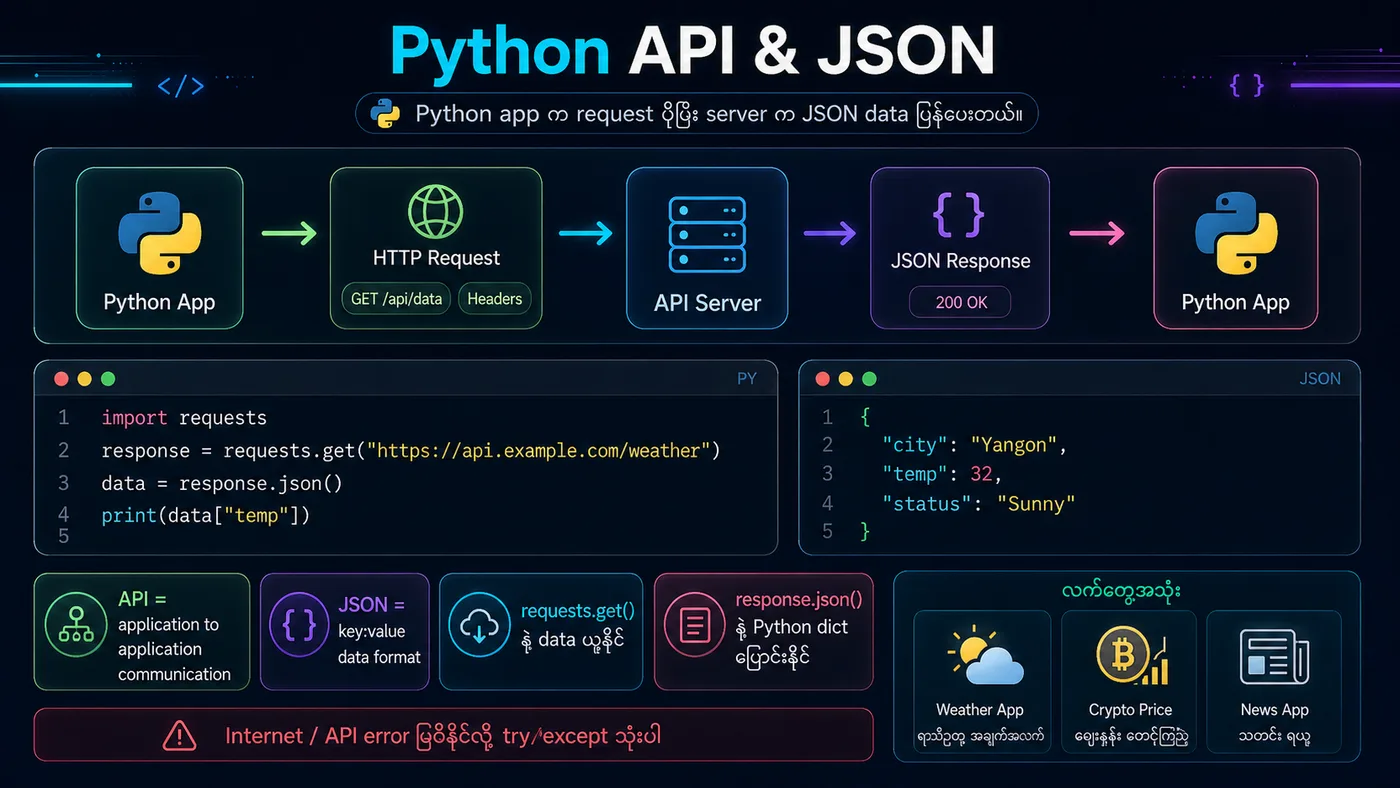
Files, Myanmar text and dates
By default dumps escapes non-ASCII characters as sequences such as \u1019, which is valid JSON but hard for people to read. When writing a file, combine ensure_ascii=False with encoding="utf-8" to keep Myanmar text as it is. default=str turns the date into the string "2024-05-01", and you will also see the tuple come back as a list.
import json
import tempfile
from datetime import date
from pathlib import Path

profile = {"name": "မောင်မောင်", "joined": date(2024, 5, 1), "tags": ("admin", "dev")}

# Default: non-ASCII text is escaped; date needs default= to be converted
print(json.dumps(profile, default=str))

# Files: always name the encoding; ensure_ascii=False keeps the real characters
path = Path(tempfile.gettempdir()) / "profile.json"
with open(path, "w", encoding="utf-8") as f:
    json.dump(profile, f, ensure_ascii=False, indent=2, default=str)
with open(path, encoding="utf-8") as f:
    loaded = json.load(f)
print(loaded["name"] == profile["name"], loaded["tags"], type(loaded["joined"]).__name__)
In real projects
Where this shows up in real projects
JSON is everywhere: every web API request and response, configuration files such as package.json and VS Code settings, structured logging that writes each log line as one JSON object, and data stored in caches. requests' response.json() and requests.post(json=...) do the same loads and dumps work behind the scenes.
Good config loaders validate the required keys, types and ranges right after parsing and report every problem in one message, so the user can fix them all at once. Larger projects often do that validation with a library such as pydantic or jsonschema. When writing the file back, they use an atomic save: write to a temporary file first, then swap it in with os.replace(), so a crash halfway through never leaves a half-written file behind.
Common mistakes
Common mistakes
1. Mixing up dump and dumps
Calling json.dump(data) without a file gives dump() missing 1 required positional argument: 'fp'. Use dumps when you want a string and dump(data, f) when you want to write to a file. The same applies to load and loads.
2. Assuming parsed data is valid data
json.loads() succeeds, then a missing key causes a KeyError later, or a port sent as the string "8000" causes a TypeError somewhere far away in the code. Validate at the boundary, right after parsing.
3. Forgetting that int keys become strings
Round-tripping {1: "a"} gives {"1": "a"}, so data[1] raises a KeyError, because JSON object keys can only be strings. Convert the keys back with int() after loading.
4. Opening files without an encoding
On Windows the default encoding may not be UTF-8, so writing Myanmar text with ensure_ascii=False can raise UnicodeEncodeError or produce garbled characters. Pass encoding="utf-8" to every open() call.
Best practices
Best practices
- Never build JSON text with f-strings or str(); build a dict and call json.dumps().
- Use indent=2 and sort_keys=True for JSON files kept in git, so diffs stay readable.
- Limit the size of external JSON before parsing it, and validate it straight after.
- When rewriting an important file, write a temporary file first and swap it in with os.replace().
Mini challenge
Mini challenge: load, validate and save a config
Write load_config(), which parses app-config JSON text, validates its fields and converts released into a date object, and save_config(), which turns the config back into JSON text.
- Raise ValueError for invalid JSON or when the top level is not an object
- app must be a str, port an int from 1 to 65535 (not a bool), debug a bool, released a YYYY-MM-DD date
- Report every problem in a single ValueError, joined with "; "
- save_config() uses indent=2 and sort_keys=True and writes the date as an ISO string
import json
from datetime import date


def load_config(text):
    # TODO: json.loads, turning JSONDecodeError into ValueError
    # TODO: the top level must be a dict
    problems = []
    # TODO: check app, port (int but not bool, 1-65535), debug, released
    # TODO: raise ValueError("; ".join(problems)) if anything failed
    # TODO: return the dict with "released" converted to a date
    ...


def save_config(config):
    # TODO: indent=2, sort_keys=True, and a default= that handles date
    ...


# TODO: load one good config and print it via save_config()
# TODO: try two or three bad configs and print each "rejected: ..." message
Expected: Output for one accepted config and three rejected ones: 2025 date { "app": "shop", "debug": false, "port": 8000, "released": "2025-03-01" } rejected: port must be an integer 1-65535; debug must be true or false; released must be YYYY-MM-DD rejected: port must be an integer 1-65535 rejected: not valid JSON: Illegal trailing comma before end of object
Show hint
bool is a subclass of int, so isinstance(True, int) is True; check the port with type(port) is int. date.fromisoformat() raises ValueError for a bad format and TypeError when given None.
Show solution
import json
from datetime import date


def load_config(text):
    try:
        raw = json.loads(text)
    except json.JSONDecodeError as e:
        raise ValueError(f"not valid JSON: {e.msg}") from e
    if not isinstance(raw, dict):
        raise ValueError("top level must be an object")
    problems = []
    if not isinstance(raw.get("app"), str):
        problems.append("app must be a string")
    port = raw.get("port")
    if type(port) is not int or not 1 <= port <= 65535:
        problems.append("port must be an integer 1-65535")
    if not isinstance(raw.get("debug"), bool):
        problems.append("debug must be true or false")
    try:
        released = date.fromisoformat(raw.get("released", ""))
    except (TypeError, ValueError):
        problems.append("released must be YYYY-MM-DD")
    if problems:
        raise ValueError("; ".join(problems))
    return {**raw, "released": released}


def save_config(config):
    return json.dumps(config, indent=2, sort_keys=True, default=date.isoformat)


good = '{"app": "shop", "port": 8000, "debug": false, "released": "2025-03-01"}'
config = load_config(good)
print(config["released"].year, type(config["released"]).__name__)
print(save_config(config))

for bad in ['{"app": "shop", "port": "8000", "debug": 1, "released": "soon"}',
            '{"app": "shop", "port": true, "debug": false, "released": "2025-03-01"}',
            '{"app": "shop",}']:
    try:
        load_config(bad)
    except ValueError as e:
        print("rejected:", e)
Quick quiz 1 / 3
Quick quiz 2 / 3
Quick quiz 3 / 3
What to remember
- dumps/loads work with strings; dump/load work with files.
- JSON has six types: tuples come back as lists, int keys as strings, and types such as date need default=.
- Always pass encoding="utf-8" for files, and ensure_ascii=False to keep Myanmar text readable.
- Handle JSONDecodeError, then validate the parsed data's fields, types and ranges.
Python Standard Library — json — Python Software Foundation