Explain it simply
Explain it simply
A data type says what kind of thing a value is and what you can do with it. Think of kitchen ingredients: you can crack an egg and dissolve salt, but you cannot crack salt. In Python you can divide two numbers, but you cannot divide two pieces of text.
Python comes with many built-in types: int and float for numbers, str for text, bool for yes or no, None for "nothing here", and list, tuple, set and dict for holding many values. Picking the right type keeps code simpler and less buggy.
| Type | In plain words | Example |
|---|---|---|
| int | Whole number | age = 25 |
| float | Decimal number | pi = 3.14 |
| str | Text | name = "Sai" |
| bool | True or false | is_active = True |
| NoneType | No value yet | result = None |
Problem → Why → Solution
The problem: a list cannot be a dict key
A delivery app needs to count how many visits each location (latitude, longitude) has had. Storing the coordinate as a list like [16.8, 96.1] and using it as a dict key crashes the program immediately. The data and the logic are fine; the choice of type is wrong.
location = [16.8, 96.1]
visits = {location: 1}
# TypeError: unhashable type: 'list'
Why is the list refused?
A dict turns each key into a number called a hash so it can find it quickly. A list is mutable, so if it changed after being used as a key, its hash would change and the dict could never find it again; Python therefore refuses lists as keys outright. An immutable tuple such as (16.8, 96.1) works perfectly.
Core concept: a type decides what a value can do
Every Python value has a type, and type() tells you which. The type changes what operators mean: 2 * 3 is 6, but "ab" * 3 is "ababab" and [1] + [2] is [1, 2]. The built-in types are easier to remember in about five groups.
| Group | Types | Examples |
|---|---|---|
| Numbers | int, float, complex | 25, 3.14, 2+1j |
| Text and bytes | str, bytes | "Sai", b"raw" |
| Sequences (ordered) | list, tuple, range | [1, 2], (1, 2), range(5) |
| Sets (no duplicates) | set, frozenset | {1, 2, 3} |
| Mapping (key-value) | dict | {"name": "Sai"} |
| Yes/no and nothing | bool, NoneType | True, False, None |
The second key distinction is mutability. list, dict and set are mutable: methods such as append() and update() change them in place. int, float, str, tuple and frozenset are immutable: word.upper() leaves word unchanged and returns a new string, which you must store in a variable. Immutable values, including tuples that contain only immutable items, are hashable, so they can be dict keys and set members; lists, dicts and sets cannot.
| Collection | Order and duplicates | Changeable? |
|---|---|---|
| list [ ] | Ordered, duplicates allowed | Yes (mutable) |
| tuple ( ) | Ordered, duplicates allowed | No (immutable) |
| set { } | No guaranteed order, no duplicates | Yes (members must be hashable) |
| dict {k: v} | Insertion order kept, unique keys | Yes (keys must be hashable) |
There are two ways to check a type. type(x) == int is True only for that exact type. isinstance(x, int) also accepts subclasses and can test several types at once, as in isinstance(x, (int, float)), so it is the usual choice. One surprise: bool is a subclass of int, so isinstance(True, int) is True, and True + True even gives 2. When you need to treat booleans separately from numbers, check for bool first.
The last idea is truthiness. When you write if value:, Python treats the value as True or False. 0, 0.0, "", [], {}, set() and None are falsy, and almost everything else is truthy, even the string "0" and the list [0].
- What type is it?
- Can it change in place?
- Can it be a key or set member?
- Is it truthy or falsy?
The answers to these four questions decide where a value can be used.
General pattern: checking types
type(value)                       # the exact type, e.g. <class 'int'>
type(value).__name__              # just the name: 'int'
isinstance(value, SomeType)       # True for SomeType and its subclasses
isinstance(value, (TypeA, TypeB)) # True if it matches any of them
bool(value)                       # how 'if value:' will treat it
type() returns a type object and isinstance() returns True or False. Use isinstance() for decisions in your logic and print(type(value)) while debugging.
Example: nine values and their types
This program prints nine built-in types with one loop, then probes some isinstance() surprises. repr() shows each value the way you would write it in code, which is why strings appear with quotes. Notice that the set {1, 2, 3, 3} keeps only one 3.
values = [25, 3.14, "Sai", True, None,
          ["apple", "banana"], ("red", "green"), {1, 2, 3, 3}, {"name": "Sai"}]

for value in values:
    print(type(value).__name__, "->", repr(value))

print(isinstance(10, int), isinstance(10, float))
print(isinstance(True, int), type(True) == int)
print(isinstance(3.5, (int, float)))
Code breakdown
- Lines 1-2
values = [25, 3.14, "Sai", True, None,One list can hold values of different types. The open bracket lets the list continue onto a second line.
- Line 5
print(type(value).__name__, "->", repr(value))type(value).__name__ gives the short name such as int or str, and repr(value) gives the quoted form such as 'Sai'. The type of None is called NoneType.
- Line 2 (set)
{1, 2, 3, 3}A set drops duplicates automatically, leaving {1, 2, 3}. Empty braces {} make an empty dict, not a set; write set() for an empty set.
- Line 8
print(isinstance(True, int), type(True) == int)bool is a subclass of int, so isinstance says True, yet the exact type is bool, so type(True) == int is False. This line shows the difference between the two checks directly.
- Line 9
print(isinstance(3.5, (int, float)))Given a tuple of types, isinstance is True if any one matches, which is handy for asking "is this a number?".
int -> 25
float -> 3.14
str -> 'Sai'
bool -> True
NoneType -> None
list -> ['apple', 'banana']
tuple -> ('red', 'green')
set -> {1, 2, 3}
dict -> {'name': 'Sai'}
True False
True False
True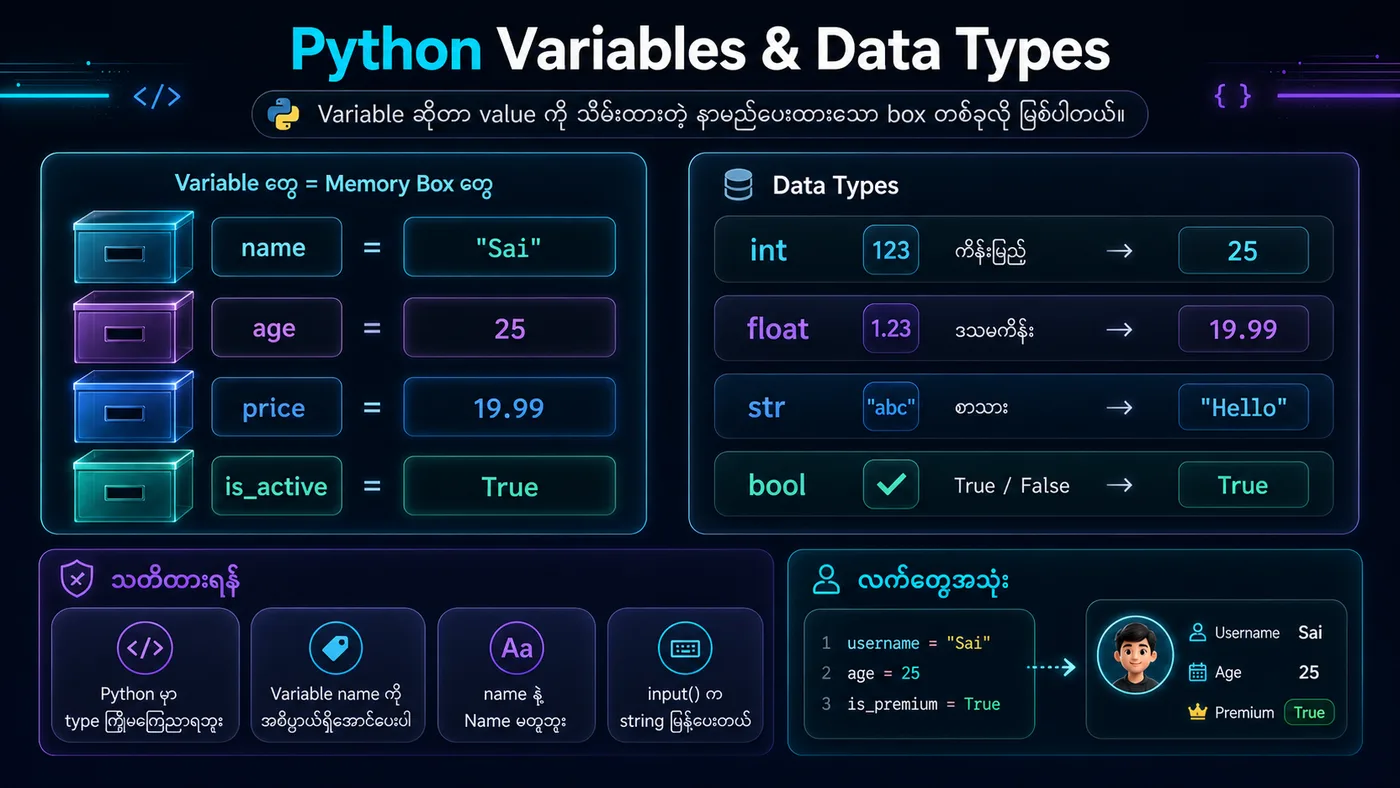
Mutability and hashability in practice
The code below uses a tuple as a dict key successfully, shows that a str method leaves the original alone while a list changes in place, and finally catches the error from the problem section with try/except.
location = (16.8, 96.1)
visits = {location: 3}
print(visits[(16.8, 96.1)])          # 3

word = "python"
loud = word.upper()
print(word, loud)                    # python PYTHON

colors = ["red"]
colors.append("blue")
print(colors)                        # ['red', 'blue']

try:
    bad = {["a", "b"]: 1}
except TypeError as err:
    print("TypeError:", err)
Truthy and falsy values
Writing if cart: is the same as asking "does cart contain anything?". Run this to see which values are falsy, and watch "0" and [0] closely. Take care where 0 is a legitimate value: if quantity: treats a quantity of 0 exactly like a missing one, so write if quantity is not None: there instead.
for value in [0, 0.0, "", [], {}, None, "0", [0], -1]:
    print(repr(value), bool(value))
In real projects
Where this shows up in real projects
When an API sends JSON, objects become dicts, arrays become lists and null becomes None, so a solid grasp of dict, list and None makes web data easy to handle. For money, float shows 0.1 + 0.2 as 0.30000000000000004, so banking and accounting code chooses decimal.Decimal or stores amounts as whole numbers in an int.
The choice of type also affects speed. Checking "have we seen this email before?" against millions of values means a list must scan item by item, while a set uses hashing and answers almost instantly. Good libraries use isinstance() to validate a function's input and raise a clear TypeError when the wrong type arrives. Databases follow the same pattern: a row read from SQLite arrives as int, float, str, bytes or None values, so the checks from this lesson apply there too.
Common mistakes
Common mistakes
1. Discarding the result of a str method
Writing name.strip() or name.upper() on its own does not change name, because str is immutable; assign the result back with name = name.strip(). list.append() is the opposite: it changes the list in place and returns None, so items = items.append(x) throws your list away.
2. Accepting a bool as an int
Using only isinstance(value, int) to check that a quantity is a number lets True and False through, and quantity = True then behaves like 1. To reject booleans, test isinstance(value, bool) first.
3. Thinking {} is an empty set
seen = {} creates an empty dict, so seen.add("x") fails with "AttributeError: 'dict' object has no attribute 'add'". Create an empty set with seen = set().
Best practices
Best practices
- Store fixed groups of values, such as coordinates or RGB colours, in tuples.
- Reach for a set when you need to remove duplicates or test membership often.
- Prefer isinstance() over type(x) == ... in your logic.
- Represent a missing value with None and test it with if value is None:, not == None.
Mini challenge
Mini challenge: classify values
Write a describe() function that takes any value and returns a label for its kind, then test it on eight sample values.
- Return "nothing" for None
- Return "yes/no" for a bool (check it before int)
- Return "number" for int or float and "text" for str
- Return "collection of N" for list, tuple, set or dict (N = number of items), otherwise "other"
def describe(value):
    # TODO: None -> "nothing"
    # TODO: bool -> "yes/no"   (why must this come before the int check?)
    # TODO: int or float -> "number"
    # TODO: str -> "text"
    # TODO: list/tuple/set/dict -> "collection of <len>"
    # TODO: anything else -> "other"
    ...


samples = [42, 2.5, True, "hi", [1, 2, 3], {"a": 1}, None, b"raw"]
# TODO: print each sample with repr() and its description
Expected: Expected output: 42: number 2.5: number True: yes/no 'hi': text [1, 2, 3]: collection of 3 {'a': 1}: collection of 1 None: nothing b'raw': other
Show hint
Pass a tuple of types, as in isinstance(value, (int, float)). Inside an f-string, {sample!r} is the same as repr(sample).
Show solution
def describe(value):
    if value is None:
        return "nothing"
    if isinstance(value, bool):
        return "yes/no"
    if isinstance(value, (int, float)):
        return "number"
    if isinstance(value, str):
        return "text"
    if isinstance(value, (list, tuple, set, dict)):
        return f"collection of {len(value)}"
    return "other"


samples = [42, 2.5, True, "hi", [1, 2, 3], {"a": 1}, None, b"raw"]
for sample in samples:
    print(f"{sample!r}: {describe(sample)}")
Quick quiz 1 / 3
Quick quiz 2 / 3
Quick quiz 3 / 3
What to remember
- A type decides what a value can do; built-in types group into numbers, text, sequences, sets and mappings.
- list, dict and set are mutable while int, float, str and tuple are immutable, and only immutable values can be dict keys.
- Use isinstance() in logic, remembering that bool is a subclass of int.
- 0, "", [], {}, set() and None are falsy; "0" and [0] are truthy.
The Python Tutorial — Python Software Foundation