Explain it simply
Explain it simply
Syntax is a language's grammar. Just as a misplaced full stop can change the meaning of a sentence, a missing colon or the wrong number of spaces in Python can stop a program from running, or make it do something else.
Python's most distinctive rule is indentation. Other languages use { } braces to say "these lines belong together"; Python looks only at the spaces at the start of each line. Lines pushed in by the same amount form one group.
Problem → Why → Solution
The problem: the wrong answer with no error
Indentation mistakes come in two kinds. The loud kind stops the program with an IndentationError, so you notice at once. The quiet kind is worse: a line at the wrong level is still valid grammar, so Python runs it, but it does something you did not intend. The code below should print a receipt line for every order, yet only one line appears.
orders = [1200, 800, 450]
total = 0
for amount in orders:
    total = total + amount
print(f"Added {amount}, total is now {total}")   # meant to be inside the loop
Why does only one line print?
The print() line sits at the same level as for, so it is not inside the loop; it runs once, after the loop finishes. To Python, indentation is meaning, not decoration: shifting that line four spaces to the right turns it into "every time round the loop". That is why you must be able to see where each block starts and ends.
Core concept: statements, blocks and indentation
A Python program is a sequence of statements, normally one per line. Some statements, such as if, for, while, def and class, are header lines: they end with a colon (:) and must be followed by an indented body. Leave out the colon and you get "SyntaxError: expected ':'"; forget to indent the body and you get "IndentationError: expected an indented block".
Every line in a body must be indented by the same amount; the PEP 8 style guide recommends four spaces. The block ends at the first line that moves back to the left (a dedent). Blocks can be nested, so the body of an if inside a for sits at eight spaces. Mixing tabs and spaces in one file can look aligned on screen while Python raises a TabError, so set your editor to insert four spaces when you press Tab.
Python is case-sensitive: name, Name and NAME are three separate variables. Keywords such as if, for, class, True and None cannot be used as names at all. For naming style, PEP 8 recommends snake_case for variables and functions (total_price), CapWords for classes (ShoppingCart) and UPPER_CASE for constants that never change (MAX_ITEMS).
| Rule | What it means | Example |
|---|---|---|
| Case-sensitive | Different capitals mean different names | name and Name are two variables |
| Indentation | Four spaces mark a block | Indent the lines under if x > 0: |
| Colon | Every header line ends with : | for item in items: |
| Line continuation | Break lines freely inside open brackets | total = (price + tax + fee), split after any + |
| Comments | Python ignores text after # | # explain why here |
When a statement is longer than one line, you can continue it freely inside ( ), [ ] or { }: Python knows the statement is unfinished until the bracket closes. A backslash (\) at the end of a line also works, but a single space after it becomes a SyntaxError, so brackets are preferred. Semicolons (;) let you put several statements on one line, but that hurts readability, so avoid them.
- A header line ends with :
- Its body is indented 4 spaces
- A nested block adds 4 more
- Moving back left ends the block
To find which block a line belongs to, look upward for the first header line that sits further left than it.
General pattern: blocks and bracketed continuation
header_statement:
    body_line          # 4 spaces: inside the block
    nested_header:
        nested_body    # 8 spaces: inside both blocks
after_block            # back at the left: the block is over

long_value = (first_part
              + second_part)
header_statement stands for code like if condition or for item in items. While a bracket is open you may break the line, and continuation lines are usually aligned for readability.
Example: blocks, case and bracketed lines
This example uses three block levels. Before running it, decide which block each line belongs to and how many times it will run. In particular, work out why lines 6 and 19 each print only once.
temperature = 31

if temperature > 30:
    print("Hot day")
    print("Drink water")
print("This line is outside the if block")

name = "Sai"
Name = "Aye"
print(name, Name)

total = (1 + 2 + 3
         + 4 + 5 + 6)
print(f"Total: {total}")

for n in range(4):
    if n % 2 == 0:
        print(n, "is even")
print("Loop finished")
Code breakdown
- Lines 3-5
if temperature > 30:A header line ending in a colon. The two prints indented by four spaces are its body, so they run only when temperature is above 30.
- Line 6
print("This line is outside the if block")Back at the left edge, so the if block has ended. Change temperature to 20 and this is the only line of the three that still prints.
- Lines 8-10
print(name, Name)name and Name are two separate variables. You should not name things like this in real code because it is confusing, but it shows that Python is case-sensitive.
- Lines 12-13
total = (1 + 2 + 3
         + 4 + 5 + 6)
Because the bracket is still open, Python does not treat the end of line 12 as the end of the statement. A trailing backslash can also continue a line, but brackets are the safer choice.
- Lines 16-18
if n % 2 == 0:The if is nested inside the for, so its print sits at eight spaces. range(4) produces 0, 1, 2, 3, and only 0 and 2 satisfy % 2 == 0 (no remainder when divided by two).
- Line 19
print("Loop finished")Back at level 0, so the for block is over: this runs once, after all four rounds of the loop.
Hot day
Drink water
This line is outside the if block
Sai Aye
Total: 21
0 is even
2 is even
Loop finished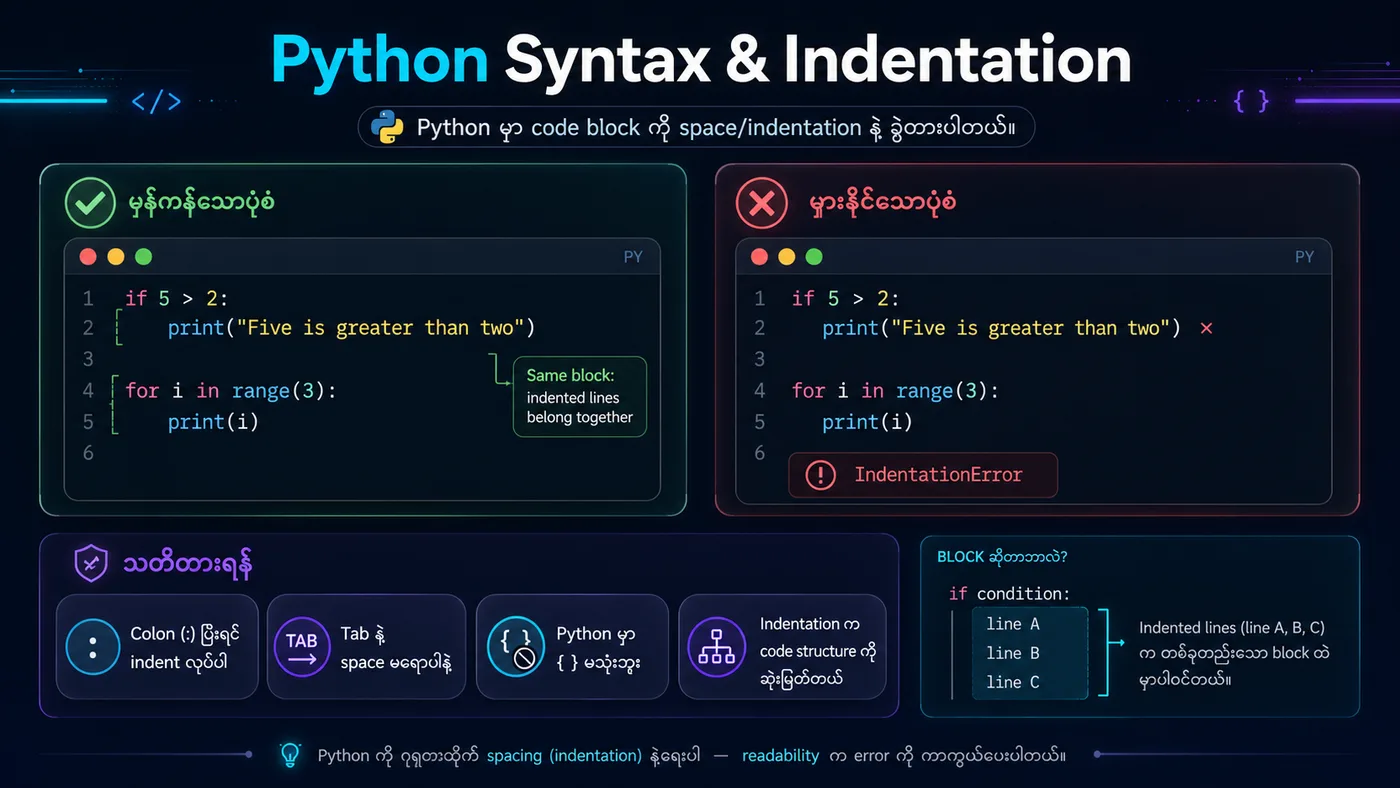
Reading the error messages
Syntax errors appear before the program runs, and Python points at the spot with a line number and a ^ marker. Sometimes the reported line is the one after the real mistake, so check the line above too. The table shows the messages Python 3.13 gives.
| Message | Meaning and fix |
|---|---|
| SyntaxError: expected ':' | Add the colon at the end of the if/for/def line |
| IndentationError: expected an indented block | Indent the body under the header by four spaces |
| IndentationError: unexpected indent | Move a line that has no header above it back to the left |
| IndentationError: unindent does not match any outer indentation level | Line the dedented row up with an existing outer level |
| TabError: inconsistent use of tabs and spaces in indentation | Convert the tabs to spaces |
In real projects
Where this shows up in real projects
On team projects nobody aligns code by hand. Formatters such as Black or Ruff rewrite a file on save so that indentation, line length and bracketed line breaks match PEP 8. Code reviews can then focus on logic instead of arguing about spaces. Many projects also run the formatter automatically before each commit and reject unformatted code in their CI pipeline.
Indentation-sensitive code shows up everywhere around Python: YAML config files, Jupyter notebook cells and Django view functions. Code copied from a website often carries tabs, so use your editor's "Convert indentation to spaces" command. In a git diff, an indentation change is a logic change, so reviewers check whitespace changes carefully too.
Common mistakes
Common mistakes
1. Putting an after-loop line inside the loop
This is the reverse of the problem section: indent print("Average:", total / len(orders)) into the loop body and it prints a half-finished average for every order. Anything that should happen once, after the loop, belongs at the same level as the for.
2. Forgetting the colon on a header line
People coming from JavaScript or C often write if x > 5 without the colon. Python 3.13 says "expected ':'" precisely, so add : at the end of the line. else: and elif condition: need the colon too.
3. A stray space after a backslash
An invisible space after the backslash in total = 1 + 2 + \ gives "SyntaxError: unexpected character after line continuation character". Wrap the whole expression in ( ) instead and the problem cannot happen.
Best practices
Best practices
- Turn on visible whitespace in your editor so tabs and spaces can be told apart.
- When blocks nest more than three levels deep, split the code into small functions.
- Keep lines to about 79 characters (PEP 8); some teams allow up to 88.
- Use pass as a placeholder in a block you have not written yet.
Mini challenge
Mini challenge: a score report
Write a program that loops over a list of scores, prints pass or retake for each, and prints a summary exactly once at the end. Getting the block levels right is the whole point.
- Inside the loop use if/else: print pass for 50 or above, retake otherwise
- Count the passes with a counter variable
- Print the summary line once, after the loop
- Build the summary string across two lines inside ( )
scores = [72, 45, 88, 50]
PASS_MARK = 50
passed = 0

for score in scores:
    # TODO: if the score reaches PASS_MARK, print "<score>: pass" and add 1 to passed
    # TODO: else print "<score>: retake"
    pass

# TODO: summary = ( "...first part..."
#                   "...second part..." )  built inside brackets
# TODO: print the summary once, outside the loop
Expected: 72: pass 45: retake 88: pass 50: pass 3 of 4 students passed (pass mark 50).
Show hint
if and else live in the for body at four spaces, and their own bodies at eight. Two string literals written side by side inside brackets are joined into one.
Show solution
scores = [72, 45, 88, 50]
PASS_MARK = 50
passed = 0

for score in scores:
    if score >= PASS_MARK:
        print(f"{score}: pass")
        passed = passed + 1
    else:
        print(f"{score}: retake")

summary = (f"{passed} of {len(scores)} students passed "
           f"(pass mark {PASS_MARK}).")
print(summary)
Quick quiz 1 / 3
Quick quiz 2 / 3
Quick quiz 3 / 3
What to remember
- Header lines such as if, for and def end with : and are followed by an indented body.
- Indentation carries meaning: a line at the wrong level can change the logic without any error.
- Always indent with four spaces and never mix in tabs.
- Python is case-sensitive; PEP 8 uses snake_case, CapWords and UPPER_CASE for names.
- Split long lines inside ( ) rather than with a backslash.
The Python Tutorial — Python Software Foundation