Explain it simply
Explain it simply
A class is like the blueprint for a house. The blueprint says how many rooms and doors there will be, but nobody can live inside the paper. Each house actually built from that blueprint is an object, also called an instance.
Each house has its own paint colour and its own owner, and in the same way each object carries its own data, called attributes. Every house has doors that open, and every object can call the functions written in the class, called methods. That is how a class keeps data and the code that works on it in one place.
Problem → Why → Solution
The problem: two carts secretly share one list
Here is a bug almost every new class author meets. The shopping cart class below writes items = [] directly in the class body. Adding an apple to cart a makes the apple appear in cart b too, even though nobody touched b. No error is raised; one customer's goods simply leak into another customer's cart.
class Cart:
    items = []                 # class attribute: ONE list for every cart

    def add(self, item):
        self.items.append(item)

a = Cart()
b = Cart()
a.add("apple")
print(b.items)                 # ['apple']  (b never added anything!)
Why does this happen?
Names assigned directly in the class body become class attributes, created once on the class object itself. When you read self.items, the object has no items of its own, so Python falls back to the class and finds that single shared list. The fix is to give every object a fresh list inside __init__ with self.items = [], which runs once per object.
Core concept: class object, instance and self
When Python runs a class statement, it creates a class object and binds it to the class name, for example Person. Calling that class object like a function, Person("Sai", 25), makes Python create an empty instance and then call __init__ on it automatically. The job of __init__ is to put the new object into a valid initial state by setting its attributes. __init__ must not return a value; the call expression itself hands back the new object.
self is the first parameter, and it refers to the current object. When you write p1.greet(), Python effectively calls Person.greet(p1) and passes p1 in as self. That is why one method reads Sai's data when called on p1 and Aye's data when called on p2. self is not a keyword, only a convention, but every Python programmer uses that name, so do not rename it.
Attributes set inside __init__, like self.name = name, are instance attributes: each object has its own copy. Names written directly in the class body, like species = "human", are class attributes shared by every object. When you read an attribute, Python looks on the object first and only then on the class.
That lookup rule makes immutable class attributes such as strings and numbers safe as defaults, because assigning self.species = "robot" creates a new attribute on that one object. Mutable values such as lists and dicts are different: calling append changes the one shared object in place. Create any data an object should own inside __init__.
Methods are functions written inside the class; they either read the object's state, like greet, or change it, like have_birthday. type(p1) tells you which class an object came from, and isinstance(p2, Person) checks whether an object is an instance of a class.
- class statement builds a class object
- Person(...) creates an empty instance
- __init__ fills attributes on self
- p1.method() passes p1 in as self
Reading an attribute checks the object first, then falls back to the class.
General pattern
class ClassName:
    shared_value = "same for all"      # class attribute

    def __init__(self, param1, param2):
        self.attr1 = param1            # instance attributes
        self.attr2 = param2

    def method_name(self, arg):
        return ...                     # uses self.attr1, arg

obj = ClassName(value1, value2)
obj.method_name(arg)
Class names use CapWords. __init__ assigns attributes onto self, and every method takes self as its first parameter. When you create an object or call a method you never pass self yourself; Python supplies it.
Example: two Person objects
This example creates two objects from one Person class. Watch how changing p1's age leaves p2 untouched, while species is the same for both because it lives on the class.
class Person:
    species = "human"          # class attribute: one value shared by all

    def __init__(self, name, age):
        self.name = name       # instance attributes: each object
        self.age = age         # gets its own copy

    def greet(self):
        return f"Hello, my name is {self.name} and I am {self.age} years old."

    def have_birthday(self):
        self.age += 1          # changes only this object


p1 = Person("Sai", 25)
p2 = Person("Aye", 30)

print(p1.greet())
print(p2.greet())

p1.have_birthday()
print(p1.age, p2.age)
print(p1.species, p2.species)
print(type(p1).__name__, isinstance(p2, Person))
Code breakdown
- Line 2
species = "human"Written directly in the class body, so it is a class attribute. It exists once, as Person.species, and every object can read it.
- Lines 4-6
def __init__(self, name, age):Runs on each new object every time Person("Sai", 25) is called. self.name and self.age become that object's own attributes.
- Line 12
self.age += 1self is whichever object the method was called on, so p1.have_birthday() changes only p1's age.
- Line 22
print(p1.age, p2.age)Prints 26 30. p1 had a birthday and is now 26, while p2 stays 30, which proves the instance attributes are separate.
- Line 24
print(type(p1).__name__, isinstance(p2, Person))type(p1) returns the Person class object and __name__ is its name as a string; isinstance() returns True.
Hello, my name is Sai and I am 25 years old.
Hello, my name is Aye and I am 30 years old.
26 30
human human
Person True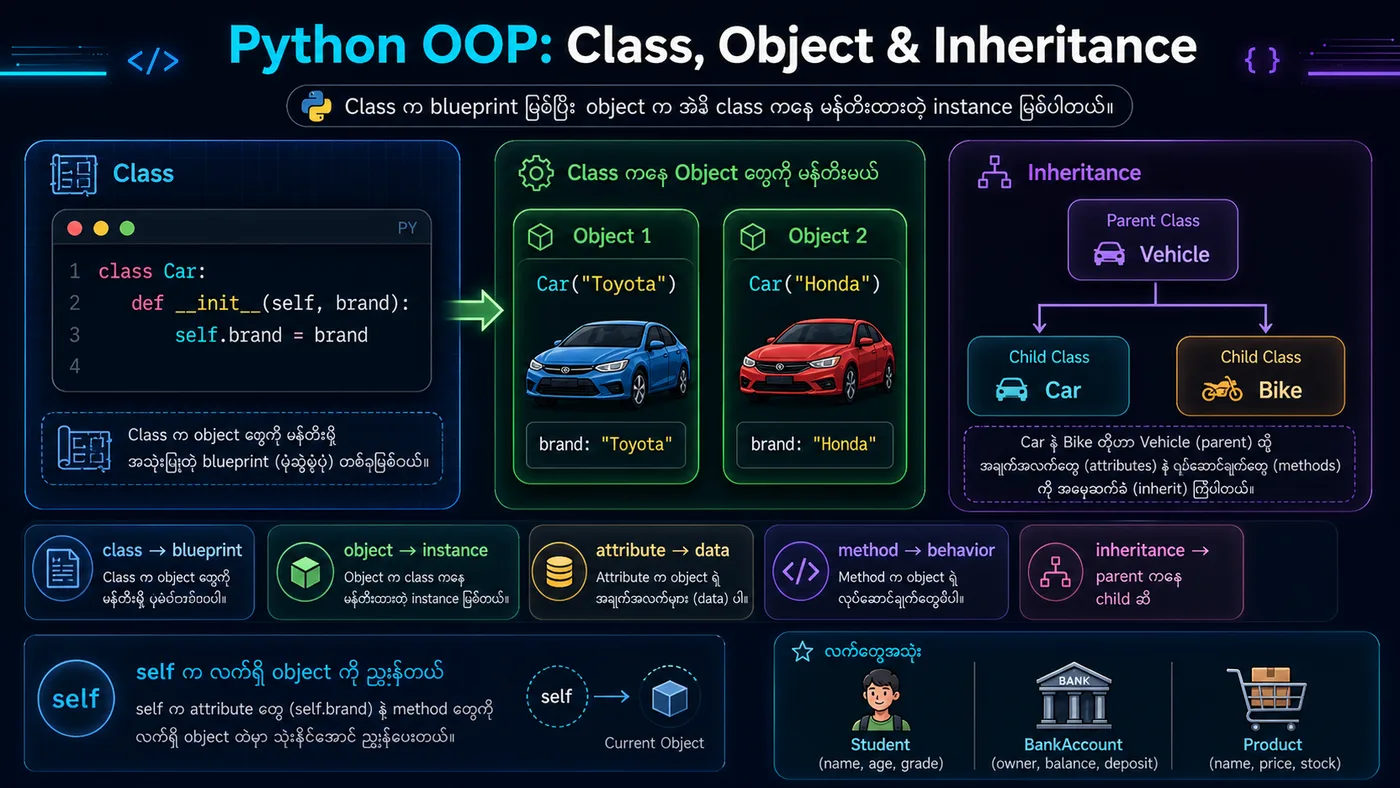
@dataclass for data-focused classes
For classes that mostly hold data, writing self.x = x again and again in __init__ is tedious. The standard library's dataclasses module generates __init__, __repr__ and __eq__ from annotated fields. Mutable defaults such as lists need field(default_factory=list) so every object gets a fresh list, which is exactly how you avoid the Cart bug above.
from dataclasses import dataclass, field

@dataclass
class Product:
    name: str
    price: float
    tags: list[str] = field(default_factory=list)

    @property
    def price_with_tax(self):
        return round(self.price * 1.05, 2)

pen = Product("Pen", 1.20)
book = Product("Book", 20.0, ["paper"])
pen.tags.append("office")
print(pen)
print(book.tags, book.price_with_tax)
print(pen == Product("Pen", 1.20, ["office"]))
It prints Product(name='Pen', price=1.2, tags=['office']), then ['paper'] 21.0, then True. Changing pen's tags leaves book's tags alone, and the generated __eq__ compares field values, which is why the last line is True.
In real projects
Where this shows up in real projects
Web applications model domain objects such as User, Order and Product as classes. Each Django model is a class, and each database row becomes an instance of it. With a method like order.total(), the pricing logic lives in one place instead of being scattered across ten views.
API clients use classes too: settings such as the base URL, timeout and session are stored once in __init__, and methods like client.get_user(42) read them back through self. You can create one client object per server, so no global variables are needed.
For classes that simply carry data, such as configuration or a parsed API response, dataclasses are the common choice. In server code, where every request must get its own object, the mutable class attribute bug is especially dangerous because it can leak one user's data to another.
Common mistakes
Common mistakes
1. Forgetting self in a method
Writing def greet(): and calling p1.greet() raises "TypeError: Person.greet() takes 0 positional arguments but 1 was given", because Python always passes p1 as the first argument. Give every method self as its first parameter.
2. Assigning without self.
Writing name = name inside __init__ only creates a local variable that vanishes when the function ends. Reading p1.name later raises AttributeError. To store data on the object, write self.name = name.
3. Keeping a list as a class attribute
items = [] in the class body makes every object share one list. Keep only constants as class attributes and create lists and dicts the object should own inside __init__.
4. Forgetting to call the class
p = Person without parentheses makes p the class itself, not an object, and p.greet() then fails with a TypeError about the missing self. Call it with parentheses and arguments: Person("Sai", 25).
Best practices
Best practices
- Create every attribute inside __init__, so a reader sees in one place what an object contains.
- Validate input such as a negative age in __init__ and raise ValueError, so an invalid object is never created.
- Give each class one responsibility; when it grows past twenty methods, consider splitting it.
Mini challenge
Mini challenge: a Playlist class
Write a Playlist class you can add songs to, and prove that two playlists do not share their song list.
- __init__(self, name) stores the name and creates a fresh songs list for each playlist
- add(title, minutes) appends a (title, minutes) tuple and raises ValueError when minutes <= 0
- Write total_minutes() and describe() methods
- Create two playlists and check with is whether their songs lists are the same object
class Playlist:
    def __init__(self, name):
        # TODO: store the name and give this playlist its own empty list
        pass

    def add(self, title, minutes):
        # TODO: reject minutes <= 0, otherwise append (title, minutes)
        pass

    def total_minutes(self):
        # TODO: add up the minutes of every song
        pass

    def describe(self):
        # TODO: return "Morning: 2 songs, 7 min"
        pass


# TODO: build "Morning" and "Gym", add songs, print describe() for both
# TODO: print whether the two songs lists are the same object
Expected: Morning: 2 songs, 7 min Gym: 2 songs, 11 min False
Show hint
sum(minutes for _, minutes in self.songs) adds up the second value of each tuple. Writing self.songs = [] inside __init__ gives each object a new list.
Show solution
class Playlist:
    def __init__(self, name):
        self.name = name
        self.songs = []        # a NEW list for every playlist

    def add(self, title, minutes):
        if minutes <= 0:
            raise ValueError("minutes must be positive")
        self.songs.append((title, minutes))

    def total_minutes(self):
        return sum(minutes for _, minutes in self.songs)

    def describe(self):
        return f"{self.name}: {len(self.songs)} songs, {self.total_minutes()} min"


morning = Playlist("Morning")
gym = Playlist("Gym")
morning.add("Sunrise", 4)
morning.add("Coffee", 3)
gym.add("Run", 5)
gym.add("Stretch", 6)

print(morning.describe())
print(gym.describe())
print(morning.songs is gym.songs)
Quick quiz 1 / 3
Quick quiz 2 / 3
Quick quiz 3 / 3
What to remember
- A class is a blueprint; each ClassName(...) call runs __init__ and returns a new object.
- self is the object a method was called on, so p1.greet() means Person.greet(p1).
- self.x set in __init__ belongs to one object; names in the class body are shared by all.
- Create mutable data in __init__, and use @dataclass with field(default_factory=...) for data classes.
Python Documentation — Classes — Python Software Foundation